
October 21 2026: Issue with YouTube videos in ReachMoreParents
We're aware that some users are currently experiencing difficulties opening or playing YouTube videos in ReachMoreParents.
This is due to a change made by YouTube to the way embedded videos are supported, which affects how videos can be accessed through both the ReachMoreParents app and web portal.
What should I do when sharing a YouTube video?
While we work on a solution, please add the YouTube link in two places when creating a Newsfeed post to ensure it can be viewed through both the app and web portal:
- Using the YouTube button: Add your video using the YouTube button in the Newsfeed editor. This allows app users to view the video.
- In the post content: Paste the same YouTube link directly into the body of your Newsfeed post. This allows web portal users to open and watch the video.
By including the link in both places, you can ensure your video is accessible to users on both platforms.
What happens next?
We're working on a solution to accommodate YouTube's changes. This will require some adjustments to ReachMoreParents.
We'll update this news post as soon as we have further information to share.
In the meantime, please follow the steps above when sharing YouTube videos.
We apologise for any inconvenience and thank you for your understanding.
October 21 2026: Service Update: Temporary Disruption to MIS Data Synchronisation
We have just been made aware of a temporary service disruption affecting Wonde, a third-party provider used by some schools to synchronise data between their Management Information System (MIS) and ReachMoreParents.
Wonde has confirmed that a global issue affecting one of its technology suppliers has led it to temporarily take its services offline as a precaution. Wonde has advised that there is currently no evidence of any impact on school data.
What does this mean for your school?
Schools using Wonde to connect their MIS to ReachMoreParents will temporarily be unable to synchronise data between the two systems.
This affects information flowing in both directions, including:
- Updates from your MIS to ReachMoreParents, such as changes to pupil, parent or staff information.
- Updates from ReachMoreParents to your MIS, such as attendance marks, where this functionality is enabled.
Information already held within ReachMoreParents will remain available, but it will not receive updates from your MIS until Wonde's services are restored.
What happens next?
Wonde is monitoring the situation and has confirmed that it will restore its services as soon as possible.
There is no action required from your school to restore the connection. However, any time-sensitive MIS updates should be checked to ensure they have been recorded correctly.
This is an external service disruption affecting Wonde, rather than a fault with ReachMoreParents.
For further information and updates directly from Wonde, please visit:
- Wonde School Portal – Further information for schools (login may be required).
- Wonde Service Status – Live updates on the service disruption.
We apologise for any inconvenience and appreciate your patience while Wonde works to restore its services.
October 12 2026: Improvements to Dynamic Custom Groups
We've made some improvements to how ReachMoreParents manages dynamic custom groups, helping you identify when a group may need updating.
Why might a group need updating?
At the start of a new academic year, your school's MIS may create new year groups, classes, registration groups or other pastoral groups.
For example, a dynamic custom group set up to include Year 7 pupils may still be linked to last year's Year 7, rather than the current Year 7 pupils.
This means some dynamic custom groups may not include the pupils you expect.
What's changed?
ReachMoreParents will now help identify where a custom group references a group that is no longer available or has been hidden within ReachMoreParents:
- A warning indicator will appear on the affected custom group.
- The specific criteria requiring attention will be highlighted when you click Edit on the group, helping you identify what needs updating.
What do you need to do?
If you see a warning, click Edit on the affected custom group, review the highlighted criteria and select the correct group.
Whilst these improvements will help identify groups that need attention, they may not catch every scenario where a group is out of date. We therefore recommend reviewing your dynamic custom groups at the start of each academic year to ensure they still include the intended pupils.
You don't need to recreate your dynamic custom groups. Simply edit the existing group to update any outdated criteria.
September 24 2026: Support update, how to get help as quickly as possible
We are continuing to receive a high volume of support enquiries as schools settle into the new academic year. Thank you for your patience while our team works through these.
For the time being, email remains the quickest and most effective way to contact Weduc Support. Prioritising email helps us respond to more customers and provide a better overall service.
Helping us help you quickly
Please email support@weduc.com with details of the issue you need help with. Keep replies about the same issue within the same email conversation, and send a new email for any separate issue or question. This helps us track and manage each enquiry clearly.
Support enquiries are worked through in the order they are received, with urgent, service-impacting or time-sensitive issues prioritised where appropriate. This helps us manage requests fairly and consistently.
Our phone lines are currently operating on voicemail rather than being answered directly. Email gives us the details of your enquiry straight away, whereas voicemail messages need to be listened to, recorded and passed into our support process before we can begin investigating.
If you do leave us a voicemail, our team may respond by email so we can continue working on your enquiry as efficiently as possible.
We also ask that support enquiries are sent directly to our Support team rather than through other Weduc teams or contact channels. This helps your enquiry reach the right people straight away.
Our Live Chat service remains temporarily unavailable. We will restore both Live Chat and normal phone availability as soon as support volumes allow.
Thank you again for your patience and understanding. Following the guidance above really does help us support everyone more efficiently.
September 11 2026: How to see which enrolment messages have been sent
September 11 2026
The Enrol Users process now sends all Email and SMS to the Messaging Queue as a background process. This means the message is processed by the System User and not your account directly so you may not see the messages being sent to your Enrolling users.
This article will detail the steps to take to audit the Email and SMS messages that were successfully sent as part of your “Enrol Users” process:
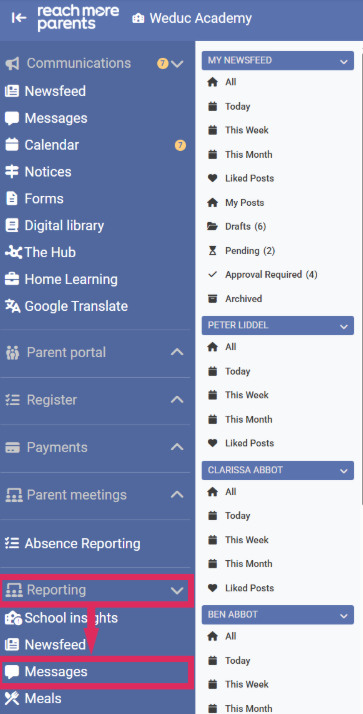
1. Go from Access Reporting to Messages:
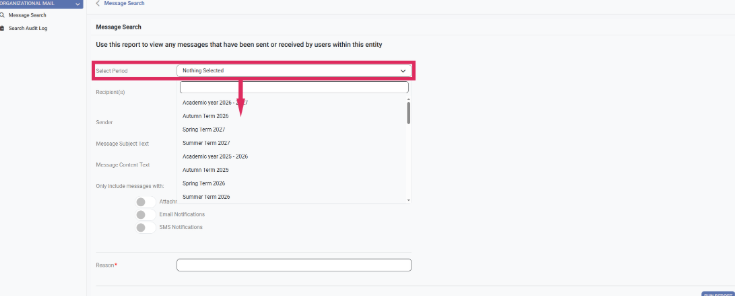
2. Set the “Select Period” field to the time period that matches when you sent the enrolment messages.
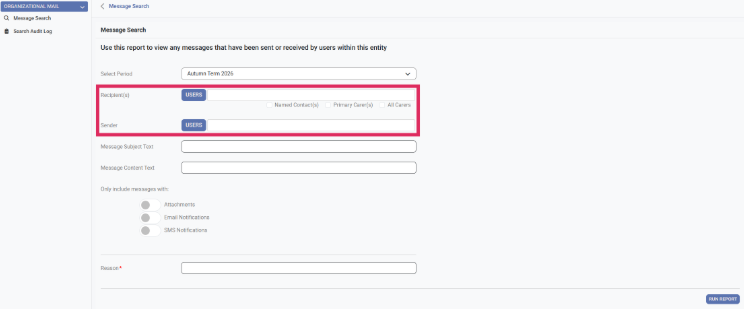
3. Leave the recipient and sender fields empty.
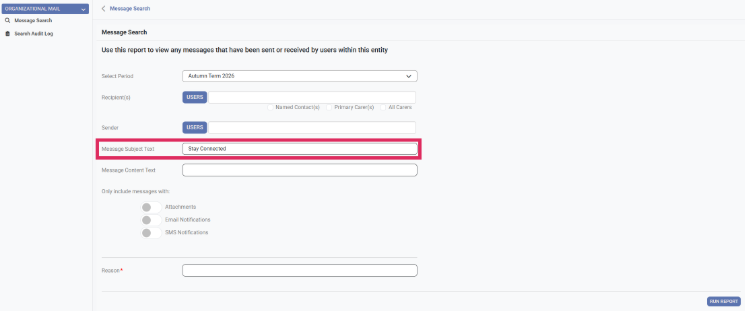
4. Set the “Message Subject Text” to “Stay Connected”.
5. Scroll down to “Only include messages with" and turn on email notifications and SMS notifications.
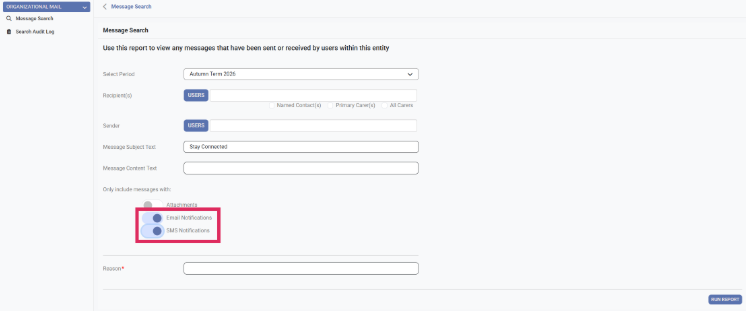
6. Set the reason to “Auditing Enrolment Messages Sent”.
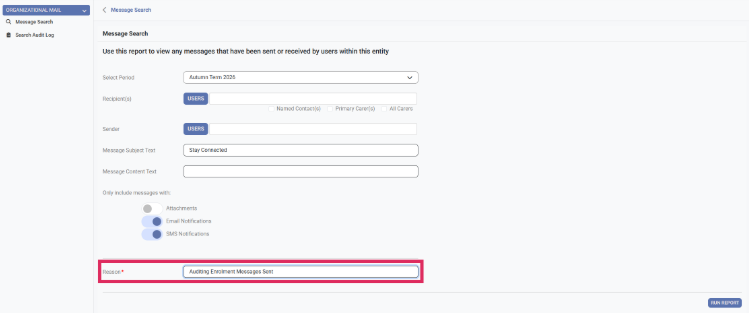
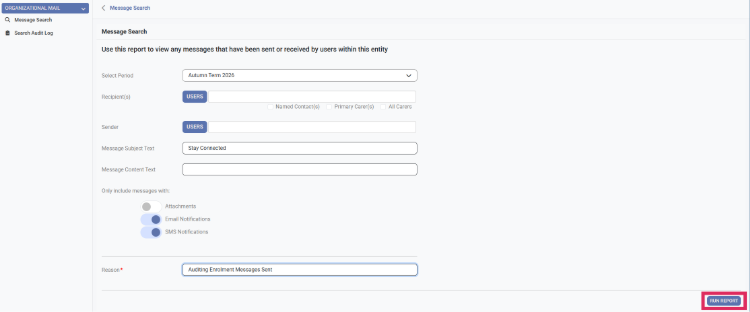
7. Click "Run Report".
8. Within the Report Result table, click “View by Recipients”.
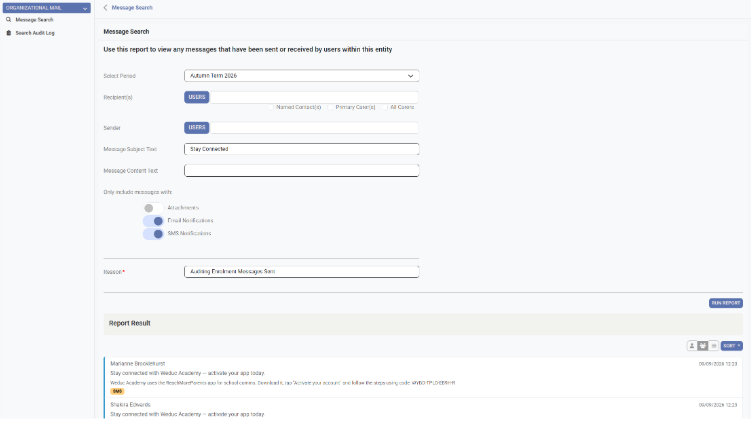
9. This will show all the enrolment emails and SMS messages that were sent by the “Enrol Users” process.
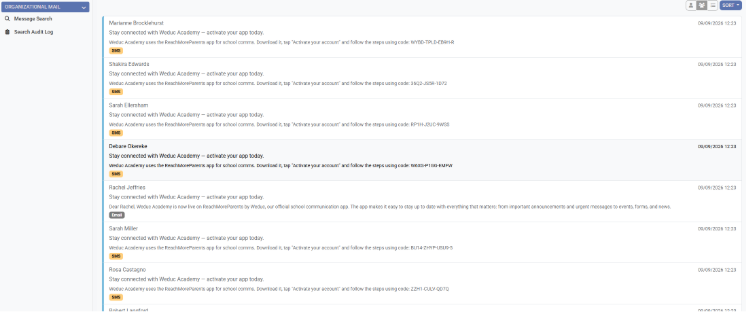
Please note: All data within this article is demonstration/test data and is not the details for legitimate users within the ReachMoreParentsproduct.
September 9 2026: Enrolling users - please allow a few minutes for enrol messages to send
At the start of the new academic year, higher than usual message volumes mean the Enrol Users process may take a little longer to complete, particularly when sending enrolment messages to larger numbers of users.
After selecting to send the messages, you may see the loading indicator remain on screen for a few moments while ReachMoreParents prepares and queues the email and SMS messages.
Please allow the process to complete and wait for the green confirmation message confirming that the messages have been sent successfully.
There is no need to run the process again while it is still loading. Doing so may result in recipients receiving the enrolment message more than once.
If you are unsure whether your enrolment messages have been sent, you can check Message Reporting before trying again.
Thank you for your patience during this particularly busy period.
September 9 2026: Temporary change to Support availability
Following the high volume of support enquiries we have received since schools returned for the new academic year, we are making a temporary change to how our Support team is available.
To help us work through enquiries as efficiently as possible, live chat will be temporarily unavailable and email will remain our primary support channel.
If you need support, please email support@weduc.com with your name, school and a brief description of your query. Providing as much relevant information as possible will help us investigate and respond more quickly.
You can still contact us by phone and leave a voicemail if we are unable to answer, but email remains the quickest and most effective way to reach the team during this busy period.
We appreciate your patience and understanding while we work through the increased demand, and we will restore live chat as soon as we are able to do so.
The Weduc Support Team
September 2 2026: Support update for the start of the new school year
We know the start of a new academic year is an incredibly busy time for schools, and our Support team is currently receiving a higher than usual volume of enquiries.
To help us respond as efficiently as possible, we are currently prioritising enquiries received by email first, followed by live chat and then phone.
For the quickest response, please email support@weduc.com and include your name, school and a brief description of your query. Providing this information when you first contact us will help the team investigate and respond more efficiently.
You can still contact us by phone. If we are unable to answer, please leave your name, school, contact number and a brief description of your query, and a member of the team will get back to you as soon as possible.
Thank you for your patience and understanding during this particularly busy period.
The Weduc Support Team
August 20 2026: Improvements to searching for users and groups
This update includes an improvement to searching for users and groups. ▶Learn more
August 20 2026: Free school meals: What’s changing in September
From September 2026, free school meal eligibility and recording is changing across England.
The Department for Education is expanding eligibility to include all pupils in households receiving Universal Credit. Schools may also see more detailed FSM categories within their MIS, including Targeted FSM, Expanded FSM and Other FSM.
What does this mean for schools using RMP Meal Manager?
There is currently no change to how free school meal entitlements are managed in Meal Manager.
Schools should continue to maintain the full FSM eligibility and classification details against each pupil within their MIS, in line with DfE requirements.
For schools using SIMS, or connecting through Wonde where FSM data is available from the MIS, pupils supplied to ReachMoreParents as FSM will continue to be treated simply as FSM within Meal Manager.
For schools where FSM data is not available through the MIS connection, schools will need to continue adding and maintaining FSM pupils manually within ReachMoreParents, just as they do today.
UIFSM also remains unchanged. Schools will need to continue adding and maintaining eligible UIFSM pupils manually within ReachMoreParents, as this information is not pulled in automatically from the MIS.
Meal Manager does not use the more detailed FSM classifications. These should remain within the MIS for the school’s records and reporting. Meal Manager simply needs to know whether a pupil should be treated as FSM for meal billing.
Meal Manager reporting will continue to show FSM and UIFSM separately where relevant. More detailed FSM classifications should continue to be managed and reported from the school MIS, where the full eligibility information is held.
August 19 2026: Getting ready for September? Check your academic year dates
With the new school year approaching, now is a good time to check that academic year and term dates are correctly set in ReachMoreParents.
For most schools, these dates do not update automatically.
The only exception is schools connected directly to SIMS, where academic year and term dates are synchronised automatically.
Dates will need to be entered manually for schools that:
-
Connect through Wonde, including where Wonde connects to SIMS
-
Use a CSV based setup
If new dates are not entered, ReachMoreParents will use default dates. These may not match the school's actual term dates.
This can affect dynamic groups that rely on academic year or term information, including:
- Attendance groups
- Behaviour groups
Checking the dates now will help make sure these groups are accurate from the start of the new school year.
Need to update the dates?
Follow the step by step guide here: Academic Year Configuration: Set or Change Your Academic Year Dates
July 27 2026: RMP will be unavailable this weekend for planned maintenance
ReachMoreParents will be unavailable from 12 noon on Saturday 1 August until the evening of Sunday 2 August while we complete our planned summer maintenance programme.
Please note, parents and other app users will also be informed through the app dashboard.
Thank you for bearing with us while this work is completed.
July 13 2026: Changing MIS provider?
July 13 2026
If your school is planning to change MIS before September, please let us know as soon as possible. We will need to review your setup, migrate or reconfigure your data, and coordinate with third-party providers such as Wonde and ParentPay where required.
Please contact our Support Team ASAP via support@weduc.com, with your new MIS provider and planned change date.
July 9 2026: Password reset update
Update: 13:10 PM - Password reset issue resolved
Users should now be able to reset their password as expected.
Thank you for your patience while our team worked on the fix.
11:15 AM - Password reset issue
We are aware of an issue affecting the password reset journey for some users.
Our team is working to solve this issue and we will share a further update here as soon as it has been resolved.
Please check this page for the latest updates.
Thank you for your patience.
July 9 2026: ParentPay links
We identified an issue affecting some ParentPay links following last night’s release.
This has now been resolved, and ParentPay links should be working as expected again.
Thank you for your patience while our team looked into this. If you continue to experience any issues, please contact our Support Team and we will be happy to help.
July 8 2026: New navigation now live
The new navigation is now live.
View our FAQs article about the new navigation Navigation update - FAQs
July 7 2026: Four simple tasks to complete before September
The summer break is the perfect opportunity to carry out a few quick housekeeping tasks that will help your school get the most from ReachMoreParents when the new academic year begins. Here are some quick but effective tips and tricks. ▶Learn more
June 25 2026: Upcoming navigation changes
Want to know more about the changes to our navigation menu? We have all the details. Check our guide for a preview. ▶Learn more
June 25 2026: Changing your branding with the upcoming new navigation
Want to know how to change your branding and colours using the new navigation menu? Check our easy guide. ▶Learn more
June 25 2026: New help icons
Upcoming help icons
As part of the navigation update, you will notice a few new icons within the portal designed to make it easier to access help, discover available features and understand what is included in your Reach More Parents package. ▶ Read more